Introduction
Upgrading a production Kafka cluster is one of those tasks that keeps platform engineers awake at night. One wrong move and you could bring down your entire message streaming infrastructure. Today, I’m walking you through a complete Kafka upgrade from version 3.7.0 to 3.9.0 using a two-phase rolling upgrade strategy that ensures zero downtime.
While this lab uses Docker for reproducibility, the same principles and commands apply to production AWS EC2 instances or any other infrastructure. The Kafka binaries and processes behave identically regardless of where they run.
Why Docker for This Lab?
Before diving in, let me address the elephant in the room: Why Docker and not EC2?
Simple answer: The Kafka upgrade process is 100% identical whether you’re running on:
- Docker containers (like this lab)
- AWS EC2 instances
- Bare metal servers
- Kubernetes pods
The only differences are:
- Process management: Docker uses systemd inside containers, EC2 might use systemd, supervisord, or init
- Volume persistence: Docker volumes vs EBS volumes vs local disks
- Networking: Docker networks vs VPC/Security Groups
But here’s the key: The Kafka binaries, configuration files, and upgrade steps are exactly the same. The commands you’ll see in this guide (kafka-topics.sh, systemctl start kafka, etc.) work identically across all environments.
Docker simply makes it easier to reproduce this lab on your laptop, tear it down, and try again without provisioning cloud infrastructure.
Cluster Architecture
Our setup consists of:
3 nodes] K1A[Kafka 3.7.0
3 brokers] ZK1A --> K1A end subgraph Phase2["Phase 2: Rolling Upgrade"] ZK2A[ZooKeeper
3 nodes] K2A[Kafka 3.9.0
3 brokers
inter.broker.protocol=3.7] ZK2A --> K2A end subgraph Phase3["Phase 3: Finalize"] ZK3A[ZooKeeper
3 nodes] K3A[Kafka 3.9.0
3 brokers
inter.broker.protocol=3.9] ZK3A --> K3A end Phase1 -->|Rolling
Restart| Phase2 Phase2 -->|Update
Protocol| Phase3
Key Configuration:
- 3 ZooKeeper nodes for metadata and coordination
- 3 Kafka brokers for distributed message streaming
- Replication factor: 3 - every partition has 3 replicas
- Min ISR: 2 - at least 2 replicas must acknowledge writes
- Network: Custom Docker network
kafka-370.localwith hostname resolution
Understanding the Two-Phase Upgrade Strategy
The upgrade follows a critical two-phase approach. Understanding why this matters will save you from production disasters.
Protocol: 3.7] B[Mixed versions
Protocol: 3.7] C[All brokers: 3.9.0
Protocol: 3.7] D[All brokers: 3.9.0
Protocol: 3.9] A -->|Phase 1: Safe| B B -->|Phase 1: Safe| C C -->|Phase 2: ⚠️ No Rollback| D
Phase 1: Rolling Binary Upgrade (Protocol Stays at 3.7)
What happens: Upgrade each broker’s binaries from 3.7.0 to 3.9.0, one at a time.
Why keep protocol at 3.7? During a rolling upgrade, your cluster runs in a mixed state:
- Broker 1 runs 3.9.0
- Broker 2 runs 3.7.0
- Broker 3 runs 3.7.0
For these brokers to communicate with each other, they need a common protocol. By keeping inter.broker.protocol.version=3.7, we ensure:
- 3.9.0 brokers can talk to 3.7.0 brokers
- Cluster remains operational during the entire upgrade
- No message loss or service disruption
Rollback: If something goes wrong, simply restart the upgraded broker with the 3.7.0 image. Easy rollback.
Phase 2: Protocol Version Update (After All Brokers Are on 3.9.0)
What happens: Update inter.broker.protocol.version from 3.7 to 3.9 and perform a rolling restart.
Why wait? Once all brokers run 3.9.0 binaries, they can safely use the 3.9 protocol for inter-broker communication. This unlocks 3.9-specific features and optimizations.
⚠️ WARNING: After updating the protocol version to 3.9, you cannot easily rollback to 3.7.0 without data loss. This is why Phase 2 should only happen after confirming Phase 1 stability.
Docker Images and Configuration
Docker Compose Setup
The initial cluster is launched using Docker Compose, which defines all 6 containers (3 ZooKeeper + 3 Kafka).
Key architecture points:
- 3 ZooKeeper nodes with persistent volumes for data and logs
- 3 Kafka brokers (3.7.0 initially) with persistent data volumes
- Custom network
kafka-370.localwith hostname resolution - Environment variables for broker ID, listeners, and ZooKeeper connection
📦 Get the complete docker-compose.yml: Available in the lab repository at the end of this post.
To start the cluster:
docker-compose up -d
Dockerfile Structure
We use separate Docker images for each Kafka version:
- kafka-370-broker: Based on Kafka 3.7.0 binaries with systemd support
- kafka-390-broker: Based on Kafka 3.9.0 binaries (protocol configurable)
Each image includes:
- Kafka binaries at
/opt/kafka - Configuration generator script for dynamic broker setup
- Systemd service definition for process management
- Pre-configured server.properties with upgrade-safe defaults
📦 Get Dockerfiles and build scripts: Available in the lab repository.
Configuration Files
The server.properties files contain critical settings for the upgrade:
Key configuration points:
inter.broker.protocol.version=3.7- Protocol compatibility during upgrademin.insync.replicas=2- Ensures durability (2 of 3 replicas must acknowledge)auto.leader.rebalance.enable=false- Prevents automatic rebalancing during upgradeunclean.leader.election.enable=false- Prevents data lossdefault.replication.factor=3- All topics replicated across all brokers
📦 Get complete configuration files: server-370.properties, server-390.properties, and all supporting configs available in the lab repository replica.fetch.max.bytes=500000 num.partitions=10
Performance settings
compression.type=lz4 num.network.threads=3
Retention
log.retention.hours=24
Safety settings (IMPORTANT for migration)
auto.leader.rebalance.enable=false Key configuration points:
inter.broker.protocol.version=3.7- Protocol compatibility during upgrademin.insync.replicas=2- Ensures durability (2 of 3 replicas must acknowledge)auto.leader.rebalance.enable=false- Prevents automatic rebalancing during upgradeunclean.leader.election.enable=false- Prevents data lossdefault.replication.factor=3- All topics replicated across all brokers
📦 Get complete configuration files: server-370.properties, server-390.properties, and all supporting configs available in the lab repository
Step-by-Step Upgrade Process
Prerequisites
Ensure Docker is running and navigate to your Kafka directory:
cd kraft-lab/kafka3.7.0
STEP 1: Initialize ZooKeeper Ensemble
What happens: Start all 3 ZooKeeper nodes and configure them as an ensemble. ZooKeeper manages cluster metadata, leader elections, and configuration.
Commands:
# Start ZooKeeper node 1
docker exec zk1 bash -c 'echo $ZOO_MY_ID > /zookeeper/data/myid'
docker exec zk1 bash -c 'echo $ZOO_SERVERS | tr " " "\n" >> /opt/kafka/config/zoo.cfg'
docker exec zk1 systemctl start zookeeper

# Start ZooKeeper node 2
docker exec zk2 bash -c 'echo $ZOO_MY_ID > /zookeeper/data/myid'
docker exec zk2 bash -c 'echo $ZOO_SERVERS | tr " " "\n" >> /opt/kafka/config/zoo.cfg'
docker exec zk2 systemctl start zookeeper

# Start ZooKeeper node 3
docker exec zk3 bash -c 'echo $ZOO_MY_ID > /zookeeper/data/myid'
docker exec zk3 bash -c 'echo $ZOO_SERVERS | tr " " "\n" >> /opt/kafka/config/zoo.cfg'
docker exec zk3 systemctl start zookeeper

# Verify ZooKeeper is running
docker exec zk1 bash -c 'echo ruok | nc localhost 2181'
# Expected: imok

docker exec zk1 systemctl status zookeeper | grep "Active:"
# Expected: Active: active (running)
Output:
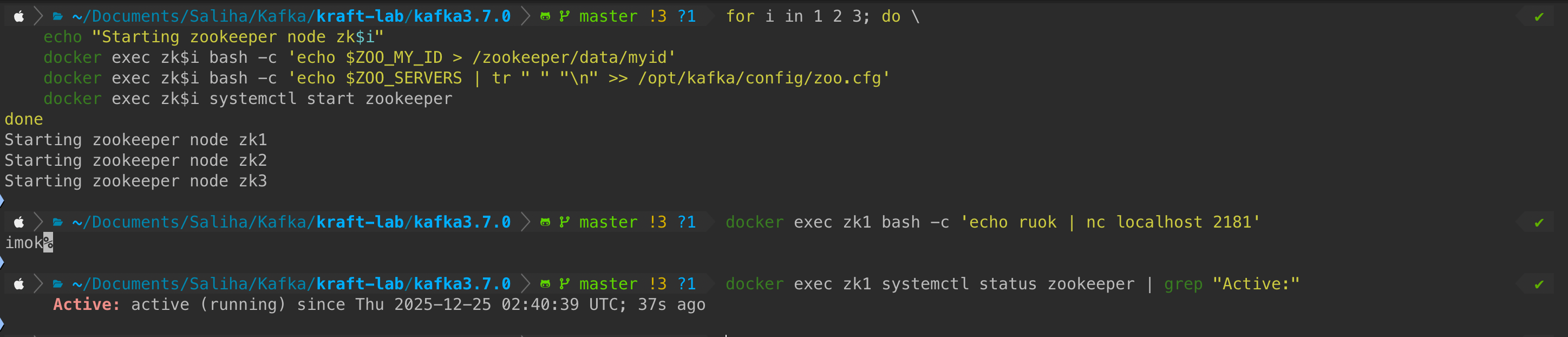
What to verify:
- ✅ All 3 ZooKeeper nodes respond with “imok” to health check
- ✅ Services show “Active: active (running)”
Caution: ZooKeeper needs at least 2 of 3 nodes (quorum) to function. If only 1 node is running, the ensemble won’t accept writes.
STEP 2: Initialize Kafka Brokers (3.7.0)
What happens: Start all 3 Kafka brokers running version 3.7.0. Each broker:
- Generates its configuration from environment variables
- Starts the Kafka service
- Registers itself with ZooKeeper
Commands:
# Start Kafka broker 1
docker exec kafka1 bash -c 'sh /var/tmp/kafka_config_generator.sh'
docker exec kafka1 systemctl start kafka

# Start Kafka broker 2
docker exec kafka2 bash -c 'sh /var/tmp/kafka_config_generator.sh'
docker exec kafka2 systemctl start kafka

# Start Kafka broker 3
docker exec kafka3 bash -c 'sh /var/tmp/kafka_config_generator.sh'
docker exec kafka3 systemctl start kafka

# Wait for brokers to start
sleep 5

# Verify all brokers registered
docker exec zk1 /opt/kafka/bin/zookeeper-shell.sh localhost:2181 ls /brokers/ids
# Expected: [1, 2, 3]
Output:
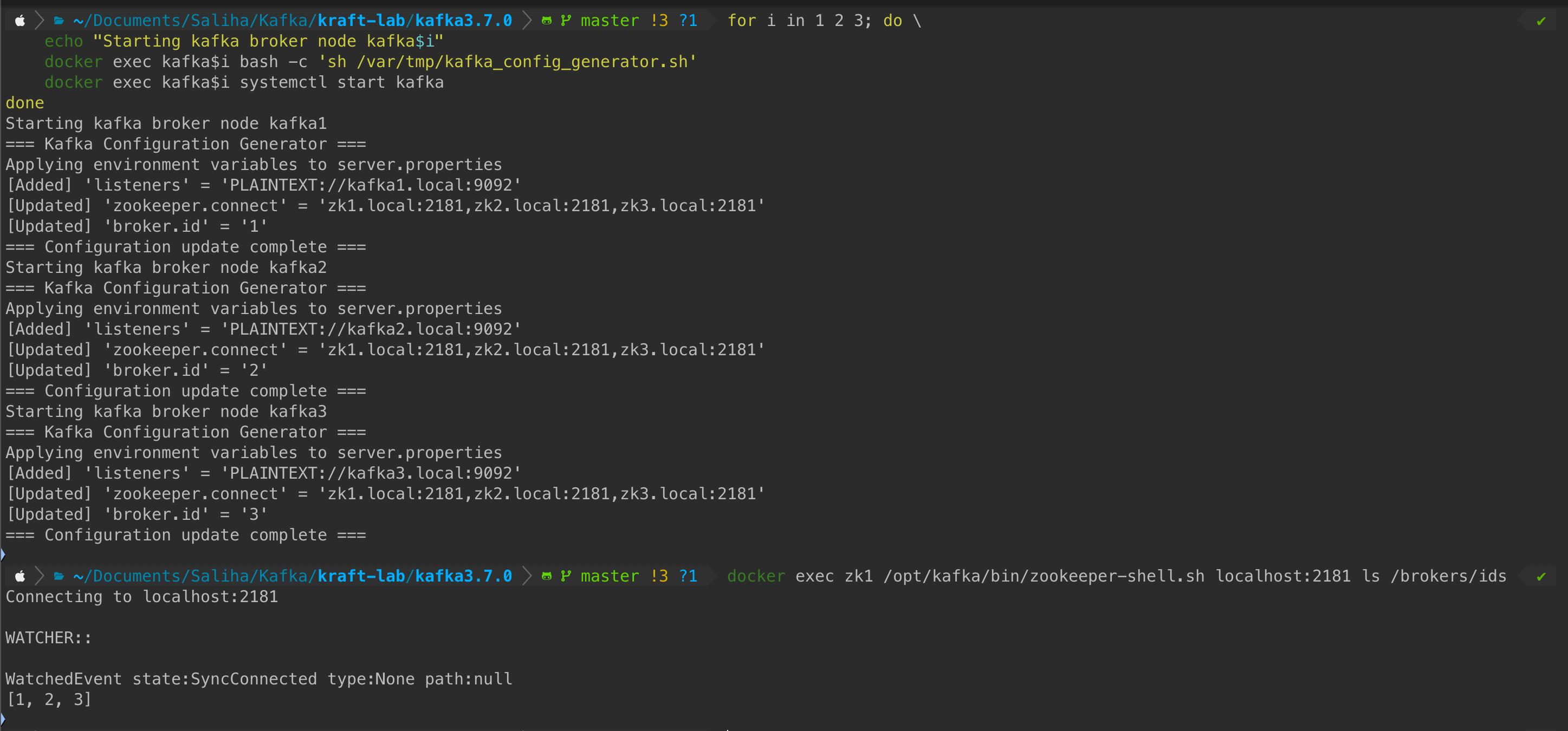
What to verify:
- ✅ Configuration generator applies environment variables successfully
- ✅ All 3 brokers (IDs: 1, 2, 3) appear in ZooKeeper’s
/brokers/idspath - ✅ No error messages in the output
Behind the scenes: The kafka_config_generator.sh script reads KAFKA_* environment variables and dynamically updates server.properties. This allows us to parameterize broker configuration without rebuilding Docker images.
STEP 3: Verify Kafka Version
What happens: Confirm all brokers are running Kafka 3.7.0 before starting the upgrade.
Command:
docker exec kafka1 ls /opt/kafka/libs | grep kafka_
# Expected: kafka_2.13-3.7.0.jar
Output:

What to verify:
- ✅ Output shows
kafka_2.13-3.7.0.jar - ✅ This confirms Scala 2.13 + Kafka 3.7.0
STEP 4: Create Test Topic
What happens: Create a test topic with 3 partitions and replication factor 3. This topic will be used throughout the upgrade to verify cluster health.
Commands:
# Create test topic
docker exec kafka1 /opt/kafka/bin/kafka-topics.sh \
  --bootstrap-server kafka1.local:9092 \
  --create --topic test \
  --partitions 3 \
  --replication-factor 3

# Describe the topic
docker exec kafka1 /opt/kafka/bin/kafka-topics.sh \
  --bootstrap-server kafka1.local:9092 \
  --describe --topic test
Output:
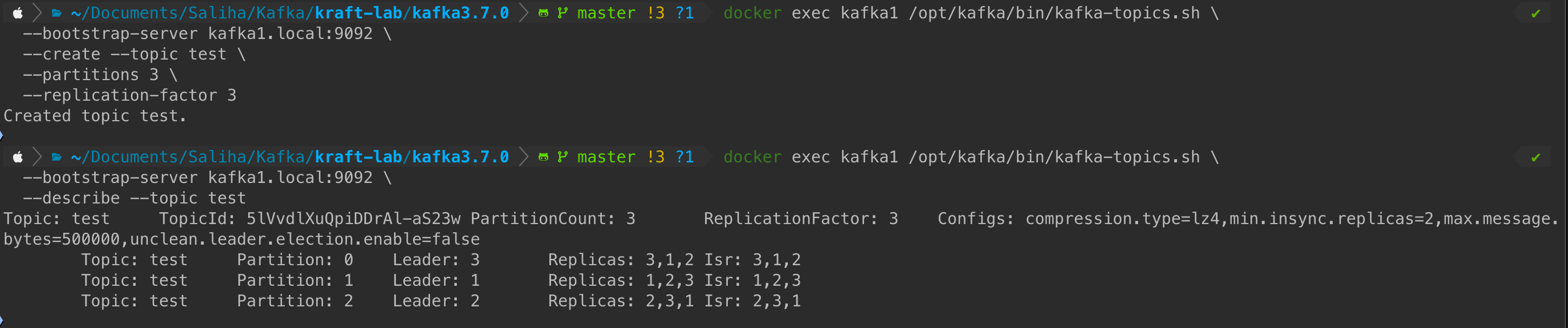
What to verify:
- ✅ Topic created successfully with 3 partitions
- ✅ Each partition has 3 replicas (Replicas: 1,2,3)
- ✅ All replicas are In-Sync (ISR: 1,2,3)
- ✅ Config shows:
min.insync.replicas=2,compression.type=lz4,max.message.bytes=500000
Why this matters: During the upgrade, we’ll continuously check this topic. If replicas fall out of sync or partitions become under-replicated, it signals a problem with the upgrade process.
PHASE 1: Rolling Binary Upgrade (Protocol Stays at 3.7)
This is the critical phase where we upgrade broker binaries one by one while maintaining cluster availability.
Upgrade KAFKA1
What happens:
- Stop the Kafka service on broker 1
- Stop and remove the 3.7.0 container
- Start a new container with the 3.9.0 image
- Regenerate configuration (protocol still at 3.7!)
- Start Kafka service
- Verify broker rejoins the cluster
⏱️ Expected time: ~30 seconds for broker to rejoin
Commands:
# Stop kafka1 service
docker exec kafka1 systemctl stop kafka

# Stop and remove container
docker stop kafka1
docker rm kafka1

# Start with 3.9.0 image
docker run -d \
  --name kafka1 \
  --hostname kafka1.local \
  --network kafka-370.local \
  --privileged \
  -v "$PWD/volumes/kafka1-data:/kafka/logs" \
  -e KAFKA_BROKER_ID=1 \
  -e KAFKA_LISTENERS=PLAINTEXT://kafka1.local:9092 \
  -e KAFKA_ZOOKEEPER_CONNECT=zk1.local:2181,zk2.local:2181,zk3.local:2181 \
  kafka-390-broker:latest

sleep 5

# Generate configuration
docker exec kafka1 bash -c "sh /var/tmp/kafka_config_generator.sh"

# Start Kafka service
docker exec kafka1 systemctl start kafka

# Wait for broker to join
sleep 15

# Verify broker is back
docker exec zk1 /opt/kafka/bin/zookeeper-shell.sh localhost:2181 ls /brokers/ids
# Expected: [1, 2, 3]

# Check version (should be 3.9.0 now)
docker exec kafka1 ls /opt/kafka/libs | grep kafka_
# Expected: kafka_2.13-3.9.0.jar

# Verify protocol is STILL 3.7
docker exec kafka1 cat /opt/kafka/config/server.properties | grep inter.broker.protocol.version
# Expected: inter.broker.protocol.version=3.7

# Check for under-replicated partitions (should be empty)
docker exec kafka1 /opt/kafka/bin/kafka-topics.sh \
  --bootstrap-server kafka1.local:9092 \
  --describe --under-replicated-partitions
Output:
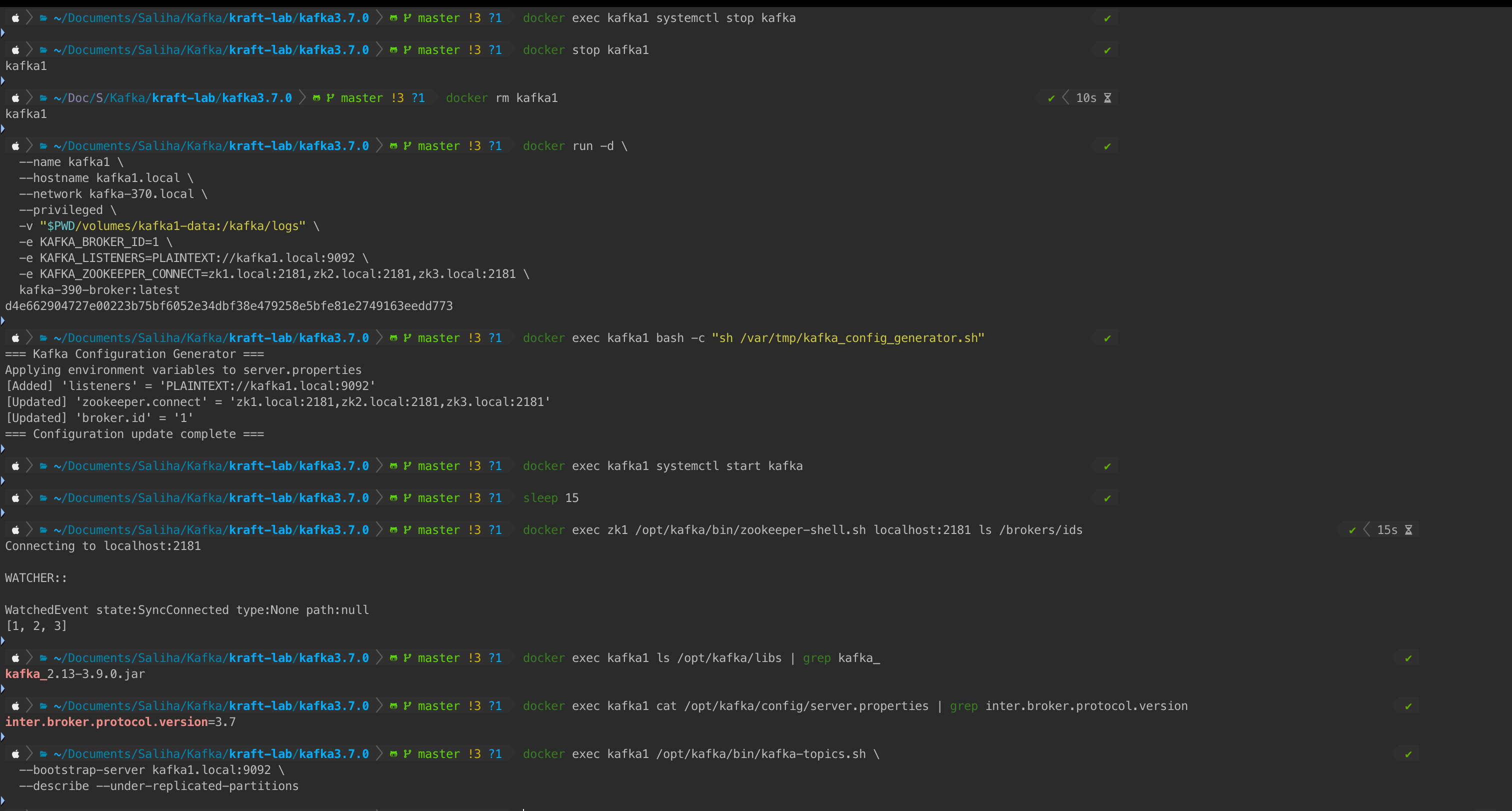
What to verify:
- ✅ Broker ID 1 appears in ZooKeeper broker list
- ✅ Kafka version shows
3.9.0.jar(binary upgraded) - ✅ Protocol version still shows
3.7(compatibility maintained) - ✅ No under-replicated partitions (cluster is healthy)
Caution: If under-replicated partitions appear, wait before proceeding. The cluster needs time to re-replicate data. Typical wait: 1-2 minutes depending on data volume.
Current cluster state:
- Broker 1: 3.9.0 binary, protocol 3.7 ✅
- Broker 2: 3.7.0 binary, protocol 3.7 (unchanged)
- Broker 3: 3.7.0 binary, protocol 3.7 (unchanged)
Upgrade KAFKA2
⚠️ Wait 1-2 minutes before upgrading the next broker to allow replica synchronization.
Commands:
# Stop kafka2 service
docker exec kafka2 systemctl stop kafka

# Stop and remove container
docker stop kafka2
docker rm kafka2

# Start with 3.9.0 image
docker run -d \
  --name kafka2 \
  --hostname kafka2.local \
  --network kafka-370.local \
  --privileged \
  -v "$PWD/volumes/kafka2-data:/kafka/logs" \
  -e KAFKA_BROKER_ID=2 \
  -e KAFKA_LISTENERS=PLAINTEXT://kafka2.local:9092 \
  -e KAFKA_ZOOKEEPER_CONNECT=zk1.local:2181,zk2.local:2181,zk3.local:2181 \
  kafka-390-broker:latest

sleep 5

# Generate configuration
docker exec kafka2 bash -c "sh /var/tmp/kafka_config_generator.sh"

# Start Kafka service
docker exec kafka2 systemctl start kafka

# Wait for broker to join
sleep 15

# Verify broker is back
docker exec zk1 /opt/kafka/bin/zookeeper-shell.sh localhost:2181 ls /brokers/ids
# Expected: [1, 2, 3]

# Check version
docker exec kafka2 ls /opt/kafka/libs | grep kafka_
# Expected: kafka_2.13-3.9.0.jar

# Check for under-replicated partitions
docker exec kafka2 /opt/kafka/bin/kafka-topics.sh \
  --bootstrap-server kafka2.local:9092 \
  --describe --under-replicated-partitions
Output:
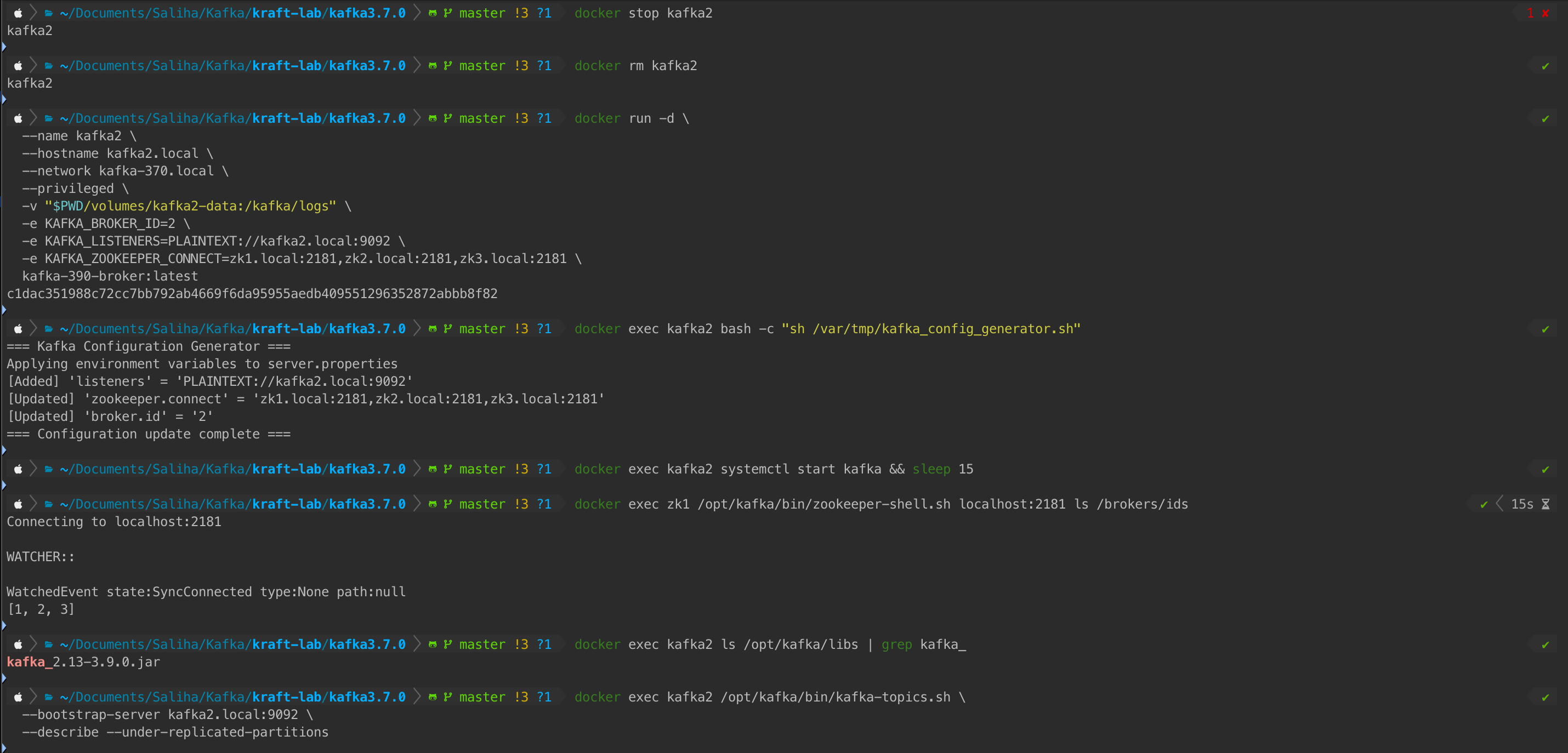
What to verify:
- ✅ All 3 brokers still in cluster
- ✅ Kafka2 running 3.9.0
- ✅ No under-replicated partitions
Current cluster state:
- Broker 1: 3.9.0 binary, protocol 3.7 ✅
- Broker 2: 3.9.0 binary, protocol 3.7 ✅
- Broker 3: 3.7.0 binary, protocol 3.7 (last one remaining)
Upgrade KAFKA3
⚠️ Wait 1-2 minutes before upgrading the final broker.
Commands:
# Stop kafka3 service
docker exec kafka3 systemctl stop kafka

# Stop and remove container
docker stop kafka3
docker rm kafka3

# Start with 3.9.0 image
docker run -d \
  --name kafka3 \
  --hostname kafka3.local \
  --network kafka-370.local \
  --privileged \
  -v "$PWD/volumes/kafka3-data:/kafka/logs" \
  -e KAFKA_BROKER_ID=3 \
  -e KAFKA_LISTENERS=PLAINTEXT://kafka3.local:9092 \
  -e KAFKA_ZOOKEEPER_CONNECT=zk1.local:2181,zk2.local:2181,zk3.local:2181 \
  kafka-390-broker:latest

sleep 5

# Generate configuration
docker exec kafka3 bash -c "sh /var/tmp/kafka_config_generator.sh"

# Start Kafka service
docker exec kafka3 systemctl start kafka

# Wait for broker to join
sleep 15

# Verify all brokers
docker exec zk1 /opt/kafka/bin/zookeeper-shell.sh localhost:2181 ls /brokers/ids
# Expected: [1, 2, 3]

# Check all versions
docker exec kafka1 ls /opt/kafka/libs | grep kafka_
docker exec kafka2 ls /opt/kafka/libs | grep kafka_
docker exec kafka3 ls /opt/kafka/libs | grep kafka_
# All should show: kafka_2.13-3.9.0.jar

# Check for under-replicated partitions
docker exec kafka3 /opt/kafka/bin/kafka-topics.sh \
  --bootstrap-server kafka3.local:9092 \
  --describe --under-replicated-partitions
Output:

What to verify:
- ✅ All 3 brokers running
- ✅ All showing 3.9.0 binaries
- ✅ No under-replicated partitions
Current cluster state:
- Broker 1: 3.9.0 binary, protocol 3.7 ✅
- Broker 2: 3.9.0 binary, protocol 3.7 ✅
- Broker 3: 3.9.0 binary, protocol 3.7 ✅
Phase 1 Complete! All brokers now run 3.9.0 binaries while still using the 3.7 protocol for compatibility.
Verify Phase 1 Completion
What happens: Comprehensive health check before proceeding to Phase 2.
Commands:
# Verify all brokers running 3.9.0
docker exec kafka1 ls /opt/kafka/libs | grep kafka_
docker exec kafka2 ls /opt/kafka/libs | grep kafka_
docker exec kafka3 ls /opt/kafka/libs | grep kafka_
# All should show: kafka_2.13-3.9.0.jar

# Check broker API versions
docker exec kafka1 /opt/kafka/bin/kafka-broker-api-versions.sh \
  --bootstrap-server kafka1.local:9092 | head -3

# Verify no under-replicated partitions
docker exec kafka1 /opt/kafka/bin/kafka-topics.sh \
  --bootstrap-server kafka1.local:9092 \
  --describe --under-replicated-partitions
# Expected: Empty output

# Verify test topic health
docker exec kafka1 /opt/kafka/bin/kafka-topics.sh \
  --bootstrap-server kafka1.local:9092 \
  --describe --topic test

# Confirm protocol still at 3.7 on all brokers
docker exec kafka1 cat /opt/kafka/config/server.properties | grep inter.broker.protocol.version
docker exec kafka2 cat /opt/kafka/config/server.properties | grep inter.broker.protocol.version
docker exec kafka3 cat /opt/kafka/config/server.properties | grep inter.broker.protocol.version
# All should show: inter.broker.protocol.version=3.7
Output:
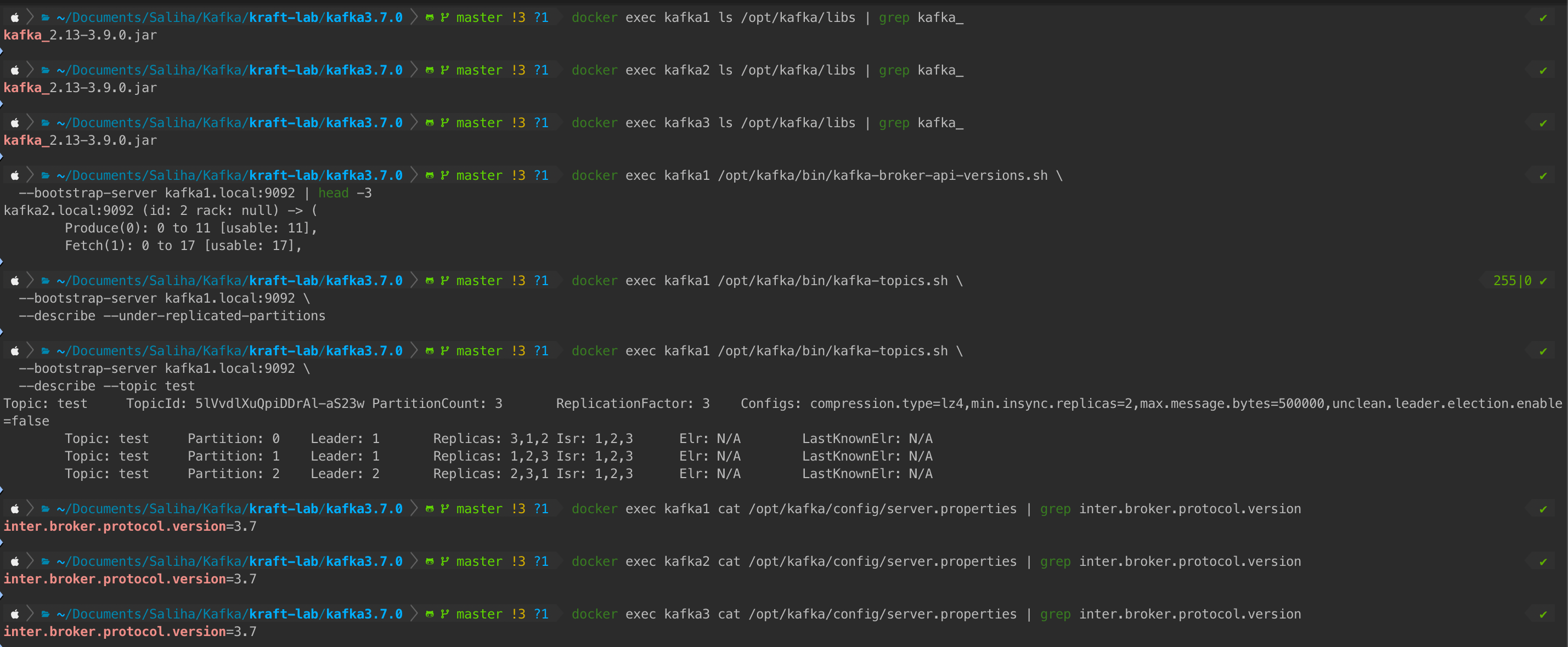
Verification Checklist:
- ✅ All brokers show 3.9.0 binaries
- ✅ All brokers still using protocol 3.7
- ✅ Broker API versions show 3.9 features available
- ✅ No under-replicated partitions
- ✅ Test topic shows all replicas in-sync (ISR)
Decision point: Only proceed to Phase 2 if ALL checks pass. If any issues appear, troubleshoot now while you can still rollback easily.
Rollback Decision Tree:
Phase 2: Protocol Version Update
What happens: Update the protocol version configuration on all brokers from 3.7 to 3.9, then perform a rolling restart to activate the new protocol.
Update Configuration Files
Commands:
# Update protocol on kafka1
docker exec kafka1 sed -i 's/inter.broker.protocol.version=3.7/inter.broker.protocol.version=3.9/g' /opt/kafka/config/server.properties
echo "✅ Updated kafka1 config"

# Update protocol on kafka2
docker exec kafka2 sed -i 's/inter.broker.protocol.version=3.7/inter.broker.protocol.version=3.9/g' /opt/kafka/config/server.properties
echo "✅ Updated kafka2 config"

# Update protocol on kafka3
docker exec kafka3 sed -i 's/inter.broker.protocol.version=3.7/inter.broker.protocol.version=3.9/g' /opt/kafka/config/server.properties
echo "✅ Updated kafka3 config"

# Verify config changes
docker exec kafka1 cat /opt/kafka/config/server.properties | grep inter.broker.protocol.version
docker exec kafka2 cat /opt/kafka/config/server.properties | grep inter.broker.protocol.version
docker exec kafka3 cat /opt/kafka/config/server.properties | grep inter.broker.protocol.version
# All should show: inter.broker.protocol.version=3.9
Output:
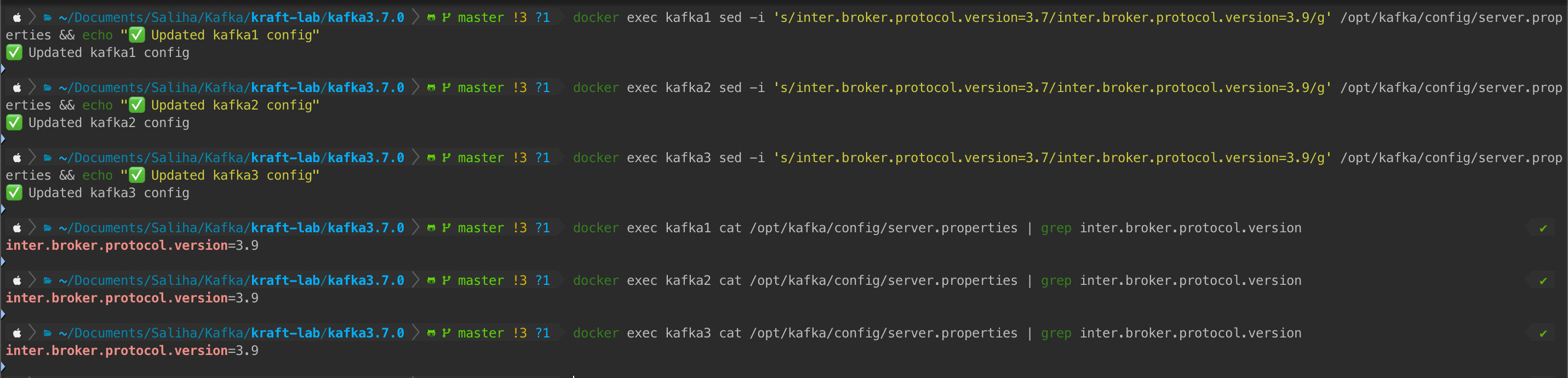
What to verify:
- ✅ Config files updated on all 3 brokers
- ✅ All show
inter.broker.protocol.version=3.9
Behind the scenes: The sed command does an in-place find-and-replace in the configuration file. However, Kafka brokers only read this file at startup, so we need a rolling restart to apply the change.
Rolling Restart
What happens: Restart each broker one by one to activate the new protocol version. During restart, the other 2 brokers handle traffic.
Commands:
# Restart kafka1
echo "Restarting kafka1..."
docker exec kafka1 systemctl restart kafka
sleep 20
docker exec zk1 /opt/kafka/bin/zookeeper-shell.sh localhost:2181 ls /brokers/ids
# Expected: [1, 2, 3]

# Restart kafka2
echo "Restarting kafka2..."
docker exec kafka2 systemctl restart kafka
sleep 20
docker exec zk1 /opt/kafka/bin/zookeeper-shell.sh localhost:2181 ls /brokers/ids
# Expected: [1, 2, 3]

# Restart kafka3
echo "Restarting kafka3..."
docker exec kafka3 systemctl restart kafka
sleep 20
docker exec zk1 /opt/kafka/bin/zookeeper-shell.sh localhost:2181 ls /brokers/ids
# Expected: [1, 2, 3]

echo "✅ All brokers restarted with protocol version 3.9"
Output:
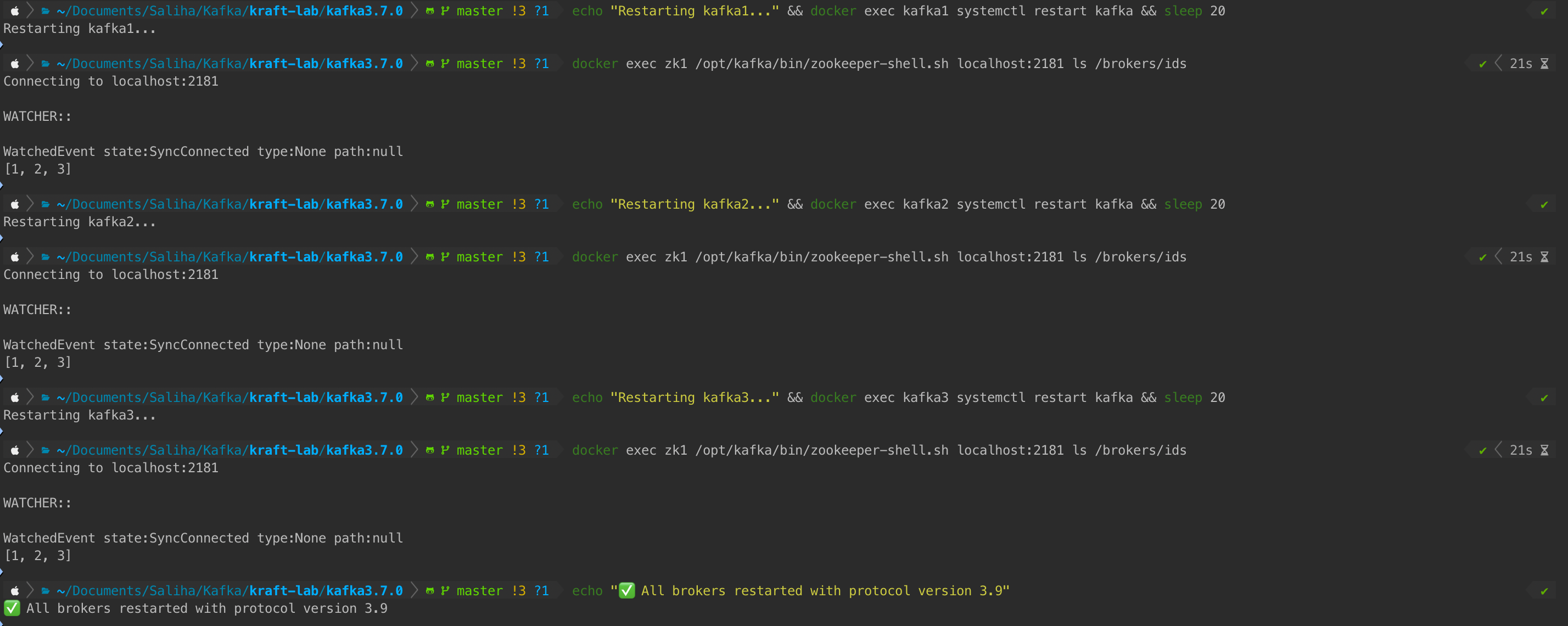
What to verify:
- ✅ After each restart, all 3 broker IDs reappear in ZooKeeper
- ✅ 20-second wait allows broker to rejoin and sync
- ✅ No broker permanently disappears
Why 20 seconds? This gives the broker time to:
- Start up (~5 seconds)
- Connect to ZooKeeper (~2 seconds)
- Register itself (~2 seconds)
- Join the cluster and start replication (~10 seconds)
In production with larger data volumes, you might increase this to 30-60 seconds.
Final Verification
What happens: Comprehensive end-to-end testing to confirm the upgrade is complete and the cluster is healthy.
Commands:
# Check cluster health - no under-replicated partitions
docker exec kafka1 /opt/kafka/bin/kafka-topics.sh \
  --bootstrap-server kafka1.local:9092 \
  --describe --under-replicated-partitions
# Expected: Empty output

# Test message production
echo "test-message-after-upgrade" | docker exec -i kafka1 \
  /opt/kafka/bin/kafka-console-producer.sh \
  --bootstrap-server kafka1.local:9092 --topic test

# Test message consumption
docker exec kafka1 /opt/kafka/bin/kafka-console-consumer.sh \
  --bootstrap-server kafka1.local:9092 \
  --topic test --from-beginning --max-messages 1
# Expected: Should see the test message

# Verify test topic details
docker exec kafka1 /opt/kafka/bin/kafka-topics.sh \
  --bootstrap-server kafka1.local:9092 \
  --describe --topic test

echo "🎉 Upgrade Complete! Kafka cluster successfully upgraded from 3.7.0 to 3.9.0"
Output:
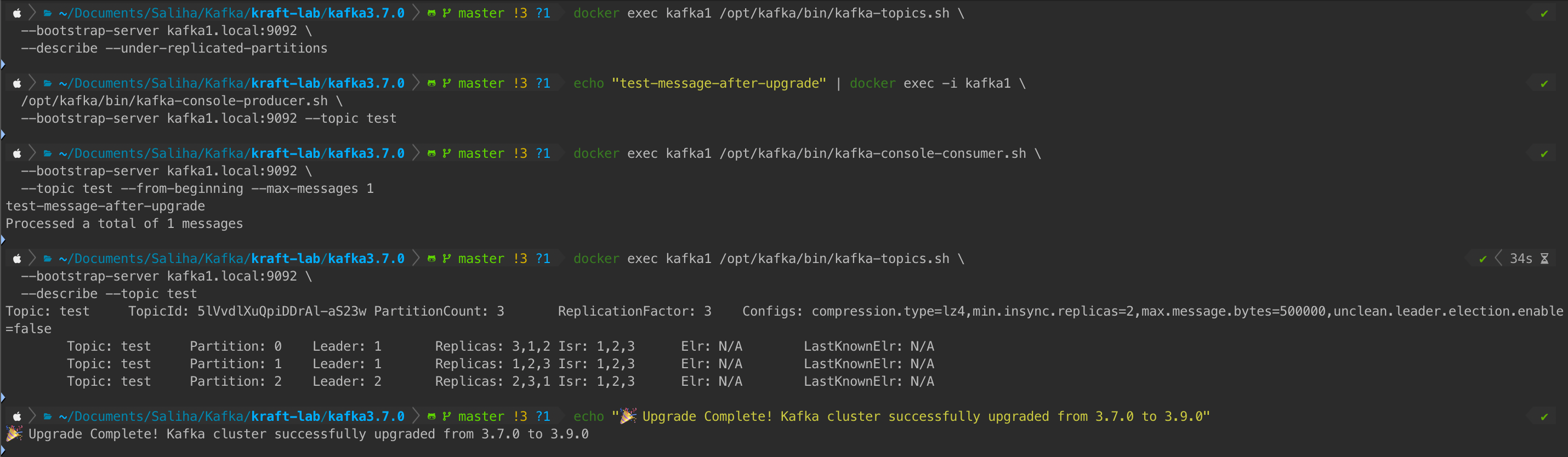
Final Checklist:
- ✅ No under-replicated partitions
- ✅ Message production works
- ✅ Message consumption works
- ✅ All partitions have ISR = 3 (all replicas in sync)
- ✅ All brokers responding to commands
Congratulations! Your Kafka cluster is now fully upgraded from 3.7.0 to 3.9.0 with zero downtime.
Troubleshooting Common Issues
Under-Replicated Partitions During Upgrade
Symptom: --describe --under-replicated-partitions returns data
Cause: Broker is catching up on replication after restart
Fix:
# Check under-replicated partitions
docker exec kafka1 /opt/kafka/bin/kafka-topics.sh \
  --bootstrap-server kafka1.local:9092 \
  --describe --under-replicated-partitions

# Wait 1-5 minutes for replication to complete
# If persists, check broker logs:
docker exec kafka1 tail -50 /kafka/logs/server.log
Prevention: Wait longer between broker upgrades (2-5 minutes instead of 1 minute)
Broker Not Joining Cluster
Symptom: Broker ID missing from /brokers/ids list
Cause: ZooKeeper connection issues or Kafka service failed to start
Fix:
# Check ZooKeeper connection
docker exec kafka1 bash -c 'echo ruok | nc zk1.local 2181'
# Expected: imok

# Check Kafka service status
docker exec kafka1 systemctl status kafka

# Check Kafka logs for errors
docker exec kafka1 tail -100 /kafka/logs/server.log
Common issues:
- ZooKeeper not responding → Restart ZooKeeper ensemble
- Port already in use → Check for duplicate containers
- Permission issues → Check volume mount permissions
Systemd Service Issues
Symptom: systemctl start kafka fails or hangs
Fix:
# Reload systemd daemon
docker exec kafka1 systemctl daemon-reload

# Restart the service
docker exec kafka1 systemctl restart kafka

# Check service logs
docker exec kafka1 journalctl -u kafka -n 50
Key Takeaways
Two-Phase Strategy Is Critical
- Phase 1: Upgrade binaries while keeping protocol at old version
- Phase 2: Update protocol after ALL brokers are upgraded
- This prevents communication failures in mixed-version clusters
Protocol Version Matters
inter.broker.protocol.versiondetermines how brokers communicate
Conclusion
Now go upgrade your Kafka clusters with confidence! 🚀
Next step: Ready to eliminate ZooKeeper entirely? Check out the Kafka ZooKeeper to KRaft Migration Guide to migrate your upgraded 3.9.0 cluster to KRaft mode.
Get the Full Lab Environment
📧 Enter your email to access the complete Kafka lab setup
Free • Docker setup • Complete scripts